Install PiOs Lite 64 Bit
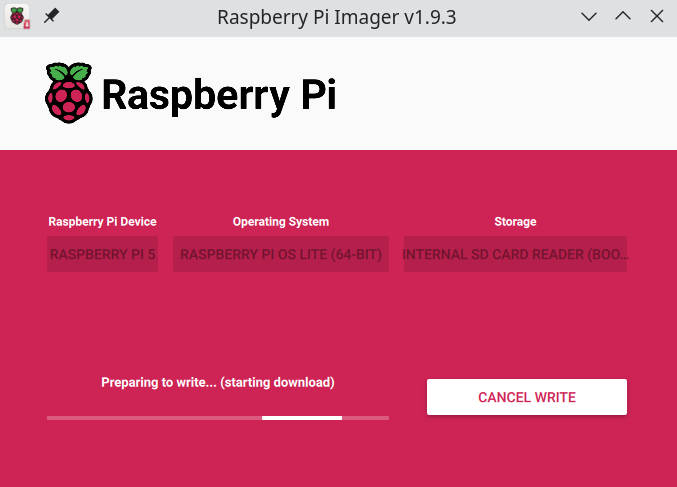
- Select your Pi
- And PiOS 64-bit Lite
- And your memory card
- Ensure that you set the hostname, enable ssh and set the username to something obscure
Select 'Write' and wait ....
Login and Run Screen
# ssh -l obscureadmin pi-name.local
# sudo apt-get install screen
# screen
Install MySQL and Sendmail
# apt install mariadb-server
# apt install sendmail
Install php 7.4 (php8.2 does not work)
# sudo apt -y install lsb-release apt-transport-https ca-certificates
# sudo wget -O /etc/apt/trusted.gpg.d/php.gpg https://packages.sury.org/php/apt.gpg
# tc/apt/sources.list.d/php.list
# apt install php7.4 php7.4-xml php7.4-mysql php7.4-mbstring
Install a few useful pre-requisites
# sudo apt install sox mpg123
Download and unpack Pi5 Installer script
# wget http://incrediblepbx.com/IncrediblePBX2027-D-RasPi.sh
# chmod a+x IncrediblePBX2027-D-RasPi.sh
# ./IncrediblePBX2027-D-RasPi.sh | tee incrediblepbx.log
And Wait for an hour or two, and reboot when prompted
Check Everything is Installed
# /root/pbxstatus-U
Notes
If you don't install php7.4 and attempt to install with version 8.2, for example - you will get problems in astrisk, for example no support for 'res_pjsip_config_sangoma'; and freepbx will fail to install properly.
----
Modify and Complete Failed Asterisk Installation
# (cd /usr/src/asterisk* ; make menuselect) # and uncheck 'res_pjsip_config_sangoma' - at the bottom of the resources list
# (cd /usr/src/asterisk* ; make install)
# systemctl enable asterisk
# systemctl start asterisk
possibly - chgrp www-data /etc/freepbx.conf
Complete Broken Freepbx Installation
# (cd /usr/src/freepbx ; ./install)
------------------------------
Edit /var/www/html/admin/libraries/utility.functions.php
and Modify Line 306 as follows:
function freepbx_error_handler($errno, $errstr, $errfile, $errline, $errcontext = 'undefined') {
----
The above sequence has the following shortfalls:
DEPRECATION WARNING - Node.js 14.x is no longer actively supported!
SCRIPT DEPRECATION WARNING - This script, located at https://deb.nodesource.com/setup_X, used to install Node.js is deprecated now and will eventually be made inactive.
spawn mysql_secure_installation
couldn't execute "mysql_secure_installation": no such file or directory
while executing
"spawn mysql_secure_installation"
(file "/tmp/mysql-setup" line 2)
--2025-07-06 23:04:42-- http://downloads.asterisk.org/pub/telephony/libpri/libpri-current.tar.gz
Resolving downloads.asterisk.org (downloads.asterisk.org)... 165.22.184.19, 2604:a880:400:d0::14:9001
Connecting to downloads.asterisk.org (downloads.asterisk.org)|165.22.184.19|:80... connected.
HTTP request sent, awaiting response... 404 Not Found
2025-07-06 23:04:47 ERROR 404: Not Found.
dahdi-linux-complete-2.11.1+2.11.1/ChangeLog
tar (child): libpri-current.tar.gz: Cannot open: No such file or directory
tar (child): Error is not recoverable: exiting now
tar: Child returned status 2
tar: Error is not recoverable: exiting now
send: spawn id exp4 not open
while executing
"send \x03"
(file "./prereq-setup" line 6)
asterisk
make[1]: Leaving directory '/usr/src/asterisk-20.14.1/menuselect'
menuselect/menuselect --check-deps menuselect.makeopts
member 'app_mysql' in category 'MENUSELECT_ADDONS' not found, ignoring.
member 'cdr_mysql' in category 'MENUSELECT_ADDONS' not found, ignoring.
member 'app_dahdiras' in category 'MENUSELECT_APPS' not found, ignoring.
member 'app_fax' in category 'MENUSELECT_APPS' not found, ignoring.
member 'cdr_syslog' in category 'MENUSELECT_CDR' not found, ignoring.
member 'chan_misdn' in category 'MENUSELECT_CHANNELS' not found, ignoring.
member 'chan_nbs' in category 'MENUSELECT_CHANNELS' not found, ignoring.
member 'chan_phone' in category 'MENUSELECT_CHANNELS' not found, ignoring.
member 'chan_vpb' in category 'MENUSELECT_CHANNELS' not found, ignoring.
member 'res_config_sqlite' in category 'MENUSELECT_RES' not found, ignoring.
Unable to find 'app_dahdiras' in category 'MENUSELECT_APPS'
Unable to find 'chan_misdn' in category 'MENUSELECT_CHANNELS'
Unable to find 'chan_nbs' in category 'MENUSELECT_CHANNELS'
Unable to find 'chan_phone' in category 'MENUSELECT_CHANNELS'
Unable to find 'res_config_sqlite' in category 'MENUSELECT_RES'
***********************************************************
The existing menuselect.makeopts file did not specify
that 'res_pjsip_stir_shaken', 'res_stir_shaken', 'test_aeap', 'test_aeap_speech', 'test_aeap_transaction', 'test_aeap_transport', 'test_capture', 'test_crypto' should not be included. However,
dependencies for this module were not found.
Either run 'make menuselect' or remove the existing
menuselect.makeopts file to resolve this issue.
***********************************************************
make: *** [Makefile:372: menuselect.makeopts] Error 255
member 'app_mysql' in category 'MENUSELECT_ADDONS' not found, ignoring.
member 'cdr_mysql' in category 'MENUSELECT_ADDONS' not found, ignoring.
member 'app_dahdiras' in category 'MENUSELECT_APPS' not found, ignoring.
member 'app_fax' in category 'MENUSELECT_APPS' not found, ignoring.
member 'cdr_syslog' in category 'MENUSELECT_CDR' not found, ignoring.
member 'chan_misdn' in category 'MENUSELECT_CHANNELS' not found, ignoring.
member 'chan_nbs' in category 'MENUSELECT_CHANNELS' not found, ignoring.
member 'chan_phone' in category 'MENUSELECT_CHANNELS' not found, ignoring.
member 'chan_vpb' in category 'MENUSELECT_CHANNELS' not found, ignoring.
member 'res_config_sqlite' in category 'MENUSELECT_RES' not found, ignoring.
Unable to find 'app_dahdiras' in category 'MENUSELECT_APPS'
Unable to find 'chan_misdn' in category 'MENUSELECT_CHANNELS'
Unable to find 'chan_nbs' in category 'MENUSELECT_CHANNELS'
Unable to find 'chan_phone' in category 'MENUSELECT_CHANNELS'
Unable to find 'res_config_sqlite' in category 'MENUSELECT_RES'
'cdr_mysql' not found
---
asterisk.service is not a native service, redirecting to systemd-sysv-install.
Executing: /lib/systemd/systemd-sysv-install disable asterisk
asterisk: no process found
mv: cannot move 'DIST' to a subdirectory of itself, 'DIST/DIST'
sed: can't read /etc/php/7.4/apache2/php.ini: No such file or directory
sed: can't read /etc/php/7.4/apache2/php.ini: No such file or directory
sed: can't read /etc/apache2/apache2.conf: No such file or directory
sed: can't read /etc/apache2/apache2.conf: No such file or directory
./IncrediblePBX2027-D-RasPi.sh: line 300: a2enmod: command not found
Failed to restart apache2.service: Unit apache2.service not found.
rm: cannot remove '/var/www/html/index.html': No such file or directory
--2025-07-06 23:18:56-- http://incrediblepbx.com/ffmpeg-release-arm64-static.tar.xz
Resolving incrediblepbx.com (incrediblepbx.com)... 154.16.200.27
Connecting to incrediblepbx.com (incrediblepbx.com)|154.16.200.27|:80... connected.
HTTP request sent, awaiting response... 404 Not Found
2025-07-06 23:18:56 ERROR 404: Not Found.
tar: ffmpeg-release-arm64-static.tar.xz: Cannot open: No such file or directory
tar: Error is not recoverable: exiting now
./IncrediblePBX2027-D-RasPi.sh: line 326: cd: ffmpeg-4*: No such file or directory
mv: cannot stat 'ffmpeg': No such file or directory
---
STARTING ASTERISK
./start_asterisk: line 45: /usr/sbin/safe_asterisk: No such file or directory
Asterisk Started
./IncrediblePBX2027-D-RasPi.sh: line 334: npm: command not found
/usr/bin/env: ‘php’: No such file or directory
./IncrediblePBX2027-D-RasPi.sh: line 340: mysqladmin: command not found
---
./incrediblerestore2021: line 67: fwconsole: command not found
Failed to stop mysqld.service: Unit mysqld.service not loaded.
Failed to stop apache2.service: Unit apache2.service not loaded.
Restoring backup...
chattr: No such file or directory while trying to stat /var/www/html/index*
---
Resetting default passwords...
./IncrediblePBX2027-D-RasPi.sh: line 507: mysql: command not found
./IncrediblePBX2027-D-RasPi.sh: line 508: mysql: command not found
./IncrediblePBX2027-D-RasPi.sh: line 509: mysql: command not found
./IncrediblePBX2027-D-RasPi.sh: line 510: mysql: command not found
./IncrediblePBX2027-D-RasPi.sh: line 511: mysql: command not found
./IncrediblePBX2027-D-RasPi.sh: line 513: mysql: command not found
./IncrediblePBX2027-D-RasPi.sh: line 514: mysql: command not found
./IncrediblePBX2027-D-RasPi.sh: line 515: mysql: command not found
./IncrediblePBX2027-D-RasPi.sh: line 521: asterisk: command not found
./IncrediblePBX2027-D-RasPi.sh: line 522: asterisk: command not found
rm: cannot remove '/tmp/systemd-private-c646ef9455ed4452b4ea5f6e41c9a75b-bluetooth.service-WTOYKF': Is a directory
rm: cannot remove '/tmp/systemd-private-c646ef9455ed4452b4ea5f6e41c9a75b-ModemManager.service-oQzzKA': Is a directory
rm: cannot remove '/tmp/systemd-private-c646ef9455ed4452b4ea5f6e41c9a75b-systemd-logind.service-KnbO77': Is a directory
rm: cannot remove '/tmp/systemd-private-c646ef9455ed4452b4ea5f6e41c9a75b-systemd-timesyncd.service-DBMeng': Is a directory
./IncrediblePBX2027-D-RasPi.sh: line 532: fwconsole: command not found
---
reated symlink /etc/systemd/system/multi-user.target.wants/fail2ban.service → /lib/systemd/system/fail2ban.service.
Setting up python3-pyinotify (0.9.6-2) ...
Setting up python3-systemd (235-1+b2) ...
Processing triggers for man-db (2.11.2-2) ...
./IncrediblePBX2027-D-RasPi.sh: line 589: newaliases: command not found
Reading package lists...
Building dependency tree...
---
Created symlink /etc/systemd/system/multi-user.target.wants/ntpsec.service → /lib/systemd/system/ntpsec.service.
Setting up ntp (1:4.2.8p15+dfsg-2~1.2.2+dfsg1-1+deb12u1) ...
Processing triggers for man-db (2.11.2-2) ...
Processing triggers for dbus (1.14.10-1~deb12u1) ...
Failed to enable unit: Refusing to operate on alias name or linked unit file: ntp.service
Failed to restart mysqld.service: Unit mysqld.service not found.
/usr/bin/env: ‘php’: No such file or directory
/usr/bin/env: ‘php’: No such file or directory
/usr/bin/env: ‘php’: No such file or directory
/root/sig-fix: line 5: mysql: command not found
/root/sig-fix: line 6: mysql: command not found
/root/sig-fix: line 7: mysql: command not found
/usr/bin/env: ‘php’: No such file or directory
/root/sig-fix: line 5: mysql: command not found
/root/sig-fix: line 6: mysql: command not found
/root/sig-fix: line 7: mysql: command not found
/usr/bin/env: ‘php’: No such file or directory
Created symlink /etc/systemd/system/multi-user.target.wants/openvpn2027.service → /etc/systemd/system/openvpn2027.service.
---
./IncrediblePBX2027-D-RasPi.sh: line 730: /var/lib/asterisk/agi-bin/nv-today.php: cannot execute: required file not found
chown: cannot access '/tmp/today.*': No such file or directory
rm: cannot remove '/root/nrclient-2.3.1.4360-free-ubuntu-amd64.deb.1': No such file or directory
./IncrediblePBX2027-D-RasPi.sh: line 747: mysql: command not found
chmod: cannot access '/var/spool/mqueue': No such file or directory
./IncrediblePBX2027-D-RasPi.sh: line 779: mysql: command not found
./IncrediblePBX2027-D-RasPi.sh: line 780: mysql: command not found
---
Once complete, cd into /usr/src/astrisk....
make menuselect
uncheck res_pjsip_config_sangoma (near the bottom)
make install
make basic-pbx
Use Pi Imager, and install bookworm PIOS Lite (64-bit) onto a memory card
The Pi5 specific version in Ward's link above (https://filedn.com/lBgbGypMOdDm8PWOoOiBR7j/Debian12/IncrediblePBX2024-pi5.zip) is actually a script, not a Pi5 system image file.
It needs to be downloaded onto an operational (Debian 12 based and internet connected) Pi5, unzipped and run in a terminal (or main console).
That would install all the required IncrediblePBX software and turn your Pi5 into a fully functional PBX.
This script changes your admin password for FreePBX 2.11 access.
Enter new admin password (MAKE IT SECURE!!): xlslwleldls
admin password will be changed to: kqq-398-dbe
Press ENTER key to continue or Ctrl-C to abort...
--------------
update asterisk.ampusers set password_sha1 = 'skwkdkskw' where username = 'admin' limit 1
--------------
ERROR 1146 (42S02) at line 1: Table 'asterisk.ampusers' doesn't exist
Done. Use browser to access FreePBX at http://192.168.1.2
Press Enter to reboot or Ctrl-C to exit...
cd /usr/src/asterisk-21.9.1
make main-bininstall
reboot
Download Image in zipfile
Unzip to get the img file
Download and install balena-etcher
download zipfile, unzip and run balena-etcher
Use balena-etcher to write image to memory card
Incrediblepbx2027: https://nerdvittles.com/a-new-incredible-pbx-2027-image-for-the-raspberry-pi/
balena etcher: https://phoenixnap.com/kb/etcher-ubuntu
- Use the "Raspberry Pi Imager" application to install a 64-bit OS onto a Pi4
- Set an obscure admin username and complex password
Incredible PBX uses Asterisk PBX ....
https://sourceforge.net/projects/pbxinaflash/files/IncrediblePBX2027%20for%20Raspberry%20Pi/
Doesn't work on the Pi because:
1. menuselect requires ncurses, but apt-get install nucrses does not work
2. asterisk make install does not work because res_pjsip_config_sangoma is not available for aarch64, and requires disabling in menuselect
sudo apt update
sudo apt install -y make build-essential wget libxml2-dev libncurses5-dev libncursesw5-dev libsqlite3-dev libssl-dev libpopt-dev libtool libspeexdsp-dev libspeex-dev libogg-dev libvorbis-dev libgsm1-dev libasound2-dev libcurl4-gnutls-dev libjansson-dev libuuid16-dev libedit-dev libeditline-dev
E: Unable to locate package libuuid16-dev
E: Unable to locate package libeditline-dev
sudo apt-get install libncurses5-dev libncursesw5-dev
https://nerdvittles.com/a-new-incredible-pbx-2027-image-for-the-raspberry-pi/